GST and Tax Compliance Setup for Your Indian Online Store: Step-by-Step

Running an online store in India comes with a set of legal and tax responsibilities that cannot be ignored once your business starts growing. GST is the most significant of these. Whether you are selling handmade goods, apparel, food products, or electronics, understanding how to register, collect, and file GST correctly protects your business from penalties and builds buyer trust at the same time.
This guide walks through the full GST and tax compliance setup process for Indian online sellers in plain language, covering registration, invoice requirements, return filing, and how to integrate compliance into your store operations from day one.
If you are building or running your store on Boomimart, the platform is built to support GST-compliant billing and invoicing natively, which removes a significant part of the manual burden from your workflow.
Do You Need to Register for GST?
Not every online seller is required to register for GST immediately, but the thresholds are low enough that most growing stores will cross them within their first year. Here is how the current framework works for e-commerce sellers in India.
| Seller Type | GST Registration Required? |
| Goods seller, turnover above Rs 40 lakh/year | Yes, mandatory |
| Service provider, turnover above Rs 20 lakh/year | Yes, mandatory |
| Seller on marketplace (Amazon, Flipkart etc.) | Yes, mandatory regardless of turnover |
| Seller on own website, below threshold | Voluntary, recommended |
| Inter-state seller of any turnover | Yes, mandatory |
If you are selling through your own website and your turnover is below the threshold, registration is technically optional. However, many buyers, particularly businesses purchasing for resale, expect a GST invoice. Registering early gives you credibility, lets you claim input tax credit on your business purchases, and avoids having to retroactively register once you grow.
Set up your GST-ready online store
Step-by-Step: GST Registration for Online Sellers
The registration process is handled entirely through the GST portal and typically takes between three to seven working days once your application is submitted correctly.
Documents You Will Need
- PAN card of the business owner or the company
- Aadhaar card for identity verification
- Bank account details with a cancelled cheque or bank statement
- Proof of business address (electricity bill, rental agreement, or ownership document)
- Digital photograph of the applicant
- Certificate of incorporation if registering as a company or LLP
The Registration Process
The GST portal at gst.gov.in is where you begin. Navigate to the registration section and choose New Registration. You will receive a Temporary Reference Number (TRN) on your email and mobile after the first step. Use that TRN to complete the rest of the application, upload your documents, and submit with a digital signature or Aadhaar-based OTP verification.
Once approved, you receive a GSTIN, which is a 15-character identifier unique to your business. This number must appear on every invoice your store issues.
Understanding GST Rates for Your Products
GST applies at different rates depending on the category of goods or services you sell. Getting this right from the start prevents issues during audits and ensures your pricing calculations are accurate.
| GST Rate | Typical Product Categories |
| 0% | Basic food grains, fresh vegetables, educational services |
| 5% | Packaged food, tea, coffee, life-saving medicines |
| 12% | Processed food, clothing above Rs 1,000, mobile phones |
| 18% | Electronics, software, most professional services |
| 28% | Luxury goods, automobiles, tobacco products |
If your store sells across multiple categories, each product line may carry a different GST rate. Your billing system needs to apply the correct rate automatically at checkout. Platforms like Boomimart handle this at the product level so you can assign the right HSN code and tax rate to each item in your catalogue without manual calculation at the time of sale.
GST-Compliant Invoicing: What Every Invoice Must Include
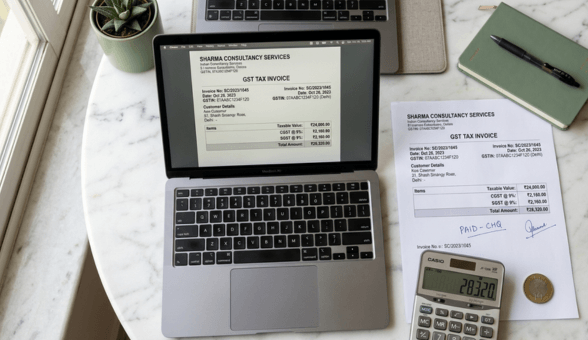
A GST invoice is not just a receipt. It is a legal document. Buyers use it to claim input tax credit, and any errors in your invoices can create problems for them and trigger scrutiny for you.
- Your registered business name and GSTIN
- Invoice number in a sequential format without gaps
- Date of the invoice
- Buyer’s name, address, and GSTIN if they are a registered business
- HSN or SAC code for each product or service
- Description of the goods or services sold
- Quantity and unit of measurement
- Taxable value before GST
- Applicable GST rate and the tax amount split into CGST, SGST, or IGST
- Total invoice amount including tax
- Place of supply, which determines whether CGST and SGST or IGST applies
The Boomimart pricing page covers the billing features built into the platform, including auto-generated GST invoices that pull all mandatory fields from your product and customer data automatically.
Set up your GST-ready online store
CGST, SGST, and IGST: Which Applies to Your Sales?
One of the most common points of confusion for new online sellers is which tax component to apply on a given sale. The answer depends entirely on where your buyer is located relative to your registered state.
| Sale Type | Tax Applied |
| Seller and buyer in the same state | CGST + SGST (split equally) |
| Seller and buyer in different states | IGST only |
| Export sales outside India | Zero-rated, no GST charged |
For an online store that ships across India, most of your sales will attract IGST since your buyers will typically be spread across states. Your billing system needs to detect the buyer’s shipping state at checkout and apply the correct tax component automatically.
Filing GST Returns: What You Need to File and When
GST compliance does not end at registration and invoicing. You are required to file returns regularly, and late filing carries penalties that accumulate daily. The filing schedule depends on your turnover and the scheme you are registered under.
GSTR-1: Outward Supply Return
This return captures all sales you have made during the period. Businesses with annual turnover above Rs 5 crore file this monthly. Those below that threshold have the option to file quarterly through the QRMP scheme. GSTR-1 data feeds directly into the buyer’s GSTR-2B, which is how they reconcile their purchase records.
GSTR-3B: Summary Return with Tax Payment
This is the consolidated summary return where you declare your total sales, total purchases, input tax credit claimed, and the net tax payable. You pay your GST liability while filing this return. Most sellers file this monthly regardless of turnover.
GSTR-9: Annual Return
Filed once a year, GSTR-9 consolidates all your monthly or quarterly data into a single annual statement. This is mandatory for businesses with turnover above Rs 2 crore. Smaller sellers can file GSTR-9A under the composition scheme if applicable.
Input Tax Credit: How to Claim It and Why It Matters
Input Tax Credit (ITC) is one of the most financially significant benefits of GST registration for online sellers. It allows you to offset the GST you have paid on business purchases against the GST you collect from your customers, so you only pay the difference.
For example, if you pay Rs 1,800 in GST on packaging material and collect Rs 5,400 in GST from your customers, you only need to deposit Rs 3,600 to the government. The rest is already covered by your input tax credit.
To successfully claim ITC, your supplier must have filed their GSTR-1 correctly, the invoice must match what appears in your GSTR-2B, and the goods or services must be used for business purposes. This is why invoice accuracy from your end and from your suppliers is not just a compliance requirement but a direct financial consideration.
Set up your GST-ready online store
TCS for E-Commerce: What Marketplace Sellers Need to Know
If you sell through online marketplaces such as Amazon, Flipkart, or Meesho, the marketplace is required to collect Tax Collected at Source (TCS) at 1% of the net sale value before remitting your payment. This TCS is not a final tax. It reflects in your GSTR-2B and can be claimed as credit against your own GST liability when you file your return.
Sellers operating their own D2C website through a platform like Boomimart are not subject to TCS since there is no marketplace operator in the transaction. This is one of the less-discussed financial advantages of running your own store rather than relying entirely on marketplace channels.
Common GST Mistakes Indian Online Sellers Make
- Applying the wrong GST rate because HSN codes were not assigned carefully during catalogue setup
- Missing the place of supply field on invoices, which causes CGST/SGST vs IGST to be applied incorrectly
- Claiming ITC on invoices that the supplier has not yet filed, which leads to mismatches in GSTR-2B
- Filing GSTR-3B without reconciling it with GSTR-1 first, creating discrepancies that trigger notices
- Not maintaining digital copies of all tax invoices and purchase bills for the mandatory six-year retention period
- Forgetting to file nil returns in months where there were no sales, which still attracts a late fee
Most of these mistakes come from manual processes. When your billing, inventory, and tax systems are connected, these errors largely disappear. The reason platforms like Boomimart embed compliance features rather than leaving them as afterthoughts is that for Indian sellers, tax accuracy directly affects profitability.
Setting Up GST Inside Your Online Store
Once you have your GSTIN, your store setup involves a few configuration steps. On Boomimart, this is handled within your store settings where you enter your GSTIN, configure the tax rates applicable to your product categories, and link your invoice template to pull all mandatory GST fields automatically.
The product catalogue then needs each item tagged with the correct HSN or SAC code. This is a one-time setup effort that pays back every time an order is placed, a return is processed, or an invoice is sent.
For sellers who are managing this for the first time, the demo request page at Boomimart gives you a walkthrough of how the billing and GST configuration works inside a live store environment, which is faster than reading documentation.