Multi-Channel Selling: Managing Instagram, WhatsApp, and Website Orders Together


Most Indian D2C sellers do not choose to sell across three separate channels, it just happens. A customer sees a reel, DMs on Instagram, someone else confirms a cash on delivery order over WhatsApp, and a third buyer checks out directly on the website late at night. Multi channel selling ecommerce India style works well for reach, but only if the orders from all three places land somewhere sensible. This guide looks at where that setup usually breaks down, and what a working version of Instagram shop sync, WhatsApp order management and a unified order inbox actually looks like in practice for a small team.
Why Three Channels Quietly Turn Into Three Separate Businesses
When a store starts, checking Instagram DMs and WhatsApp a few times a day is manageable. Once daily orders cross fifteen or twenty, the picture changes fast. Instagram brings in browsers who ask questions before buying, often comparing prices across three or four accounts before committing. WhatsApp becomes the default for cash on delivery confirmations, payment link follow ups, and the occasional customer who wants to change their address after the order is already packed. The website quietly earns the trust of repeat customers who already know the brand and just want a fast checkout without a conversation. Each channel ends up with its own rhythm, its own backlog and, more often than not, its own version of what is actually in stock.
The Real Cost of Running Disconnected Order Channels
The cost of this shows up in small ways that add up fast. A product sells out on the website while Instagram still shows it as available, so a DM order comes in for something that cannot be fulfilled, forcing an awkward refund conversation. A WhatsApp confirmation gets buried under twenty other chats and the order ships two days late, right when the customer was tracking it closely. A customer who bought once through Instagram and again through the website is treated like two different people, so no one notices they are a repeat buyer worth prioritising with a loyalty offer. None of these problems come from bad products or weak marketing. They come from three channels operating like three separate shops that happen to share the same warehouse and the same delivery partner.
How Instagram Shop Sync Actually Works With Your Inventory
Instagram Shop pulls its catalog from a product feed, usually connected through Meta Commerce Manager or a linked ecommerce platform. When that feed updates in real time, tagged products in posts and reels reflect current stock and pricing automatically, so a customer tapping through a reel sees the same price and availability as someone on the website. The trouble starts when the feed is uploaded manually once a week, or when a platform treats Instagram as a separate sales channel rather than a mirror of the same inventory used everywhere else. That gap is exactly where overselling creeps in, since a product can look available on Instagram for days after it has actually run out on the website.
| Channel | Typical Use | Where Sync Usually Breaks |
| Discovery led browsing and DM orders | Catalog feed updates too slowly for real stock levels | |
| Cash on delivery confirmation, repeat orders | No native inventory link, relies on manual tracking | |
| Website | Direct checkout, returning customers | Needs to reflect the same stock as Instagram and WhatsApp |
Setting Up WhatsApp Order Management That Does Not Rely on Memory
WhatsApp’s own business commerce tools, including catalog and quick reply features, let sellers share a product catalog directly inside a chat rather than typing out details each time a customer asks. That helps with speed, but catalog sharing alone does not solve order tracking. What actually works is tagging every WhatsApp order with a channel label the moment it is confirmed, then feeding that into the same order list used for Instagram and the website, rather than keeping WhatsApp orders in a separate notebook, a screenshot folder, or a spreadsheet tab that only one person checks.
What a Unified Order Inbox Actually Looks Like Day to Day
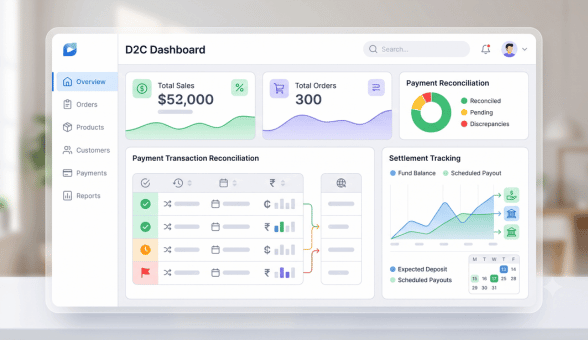
A unified order inbox is simply one place where every order from every channel lands with its source attached, its stock already deducted, and its status visible to anyone on the team, whether they are packing, dispatching or handling a customer query. Ecommerce platforms built for Indian D2C sellers show this as a single dashboard view rather than three browser tabs open at once alongside a notebook. The value is not the dashboard itself, it is that a person packing orders in the morning does not need to check Instagram, WhatsApp and the website separately to know what has actually been sold, and a support person does not need to ask three different people where an order stands.
Avoiding Duplicate Orders and Stock Mismatches Across Channels
A few habits reduce channel confusion significantly, even before any new tool is introduced. Keep one product catalog as the single source of truth, and update every channel from that source rather than editing each one separately by hand. Tag every incoming order with its channel the moment it arrives, even if it is a manual WhatsApp entry typed into a shared sheet. Run a stock reconciliation at least twice a day rather than once, since the gap between a sale on one channel and its reflection everywhere else is exactly where duplicate orders and overselling happen, particularly during a sale or a viral reel.
| Task | How Often | Why It Matters |
| Match new orders across channels to inventory | Twice daily | Prevents selling out of stock items on a second channel |
| Update WhatsApp catalog from master product list | Daily | Keeps cash on delivery orders aligned with real stock |
| Reconcile courier handover against all channel orders | End of day | Catches missed or duplicate shipments before delivery |
Where Sellers Go Wrong When Adding New Tools
A common mistake sellers make once they notice the chaos is buying a new tool for each channel, an Instagram automation bot, a separate WhatsApp broadcasting tool, and a website plugin, without checking whether any of them share data with each other. This often makes the problem worse rather than better, since now there are three dashboards instead of three inboxes, and none of them agree on stock levels. The better approach is to pick tools, or a single platform, where the underlying product and order data is genuinely shared across Instagram, WhatsApp and the website, rather than three tools that each claim to solve multi channel selling on their own.
Team roles matter as much as the tools. In most small teams, one person ends up unofficially responsible for reconciling all three channels at the end of the day, usually without being told that is their job. Naming this responsibility clearly, even if it rotates weekly, prevents orders from falling through simply because everyone assumed someone else was checking. A short daily habit, checking all three channels against the master order list before the courier pickup, catches most mismatches before they become refunds or complaints.
Handling Order Spikes During Sales Without Losing Track
Festive weekends and flash sales are where multi channel order management is tested the hardest, since all three channels spike at once instead of trickling in through the day. A store that comfortably handles twenty orders a day across Instagram, WhatsApp and the website can suddenly see two hundred orders in six hours during a sale, and any manual reconciliation habit that worked on a normal day usually collapses under that volume. The sellers who get through a sale weekend without a pile of angry messages are usually the ones who tightened their stock buffers in advance, paused Instagram tagging on products expected to sell out fast, and assigned one person purely to watch stock levels rather than splitting that job across whoever is free. Planning for this a week ahead, rather than reacting once orders start piling up, is what actually protects the customer experience during the exact moment new customers are forming their first impression of the brand.
A Practical Starting Point for Bringing All Three Together
The fastest way to start fixing this is not to buy new software, it is to audit what is currently happening this week. List every order source used in the last seven days, note where each one is tracked today, and look for the gaps where a channel is not talking to the others. From there, centralising the product catalog is the single highest impact change, since Instagram shop sync and WhatsApp order management both depend on that catalog being accurate in the first place.
Sellers moving from manual tracking to a shared dashboard usually notice the biggest difference within the first two weeks, mainly because the team stops second guessing whether a product is actually available before promising it to a customer on any channel.
For sellers who want to see how order tagging and catalog sync work together before switching anything, a live walkthrough is often the fastest way to understand the setup end to end, and a good starting point before deciding which parts of the current process actually need to change.